
Choose your card link (slug)
The exact rule for an MJX Card link name — 3 to 40 lowercase letters, numbers and single hyphens, not a reserved word, not already taken — and why it cannot be changed after the card is made.
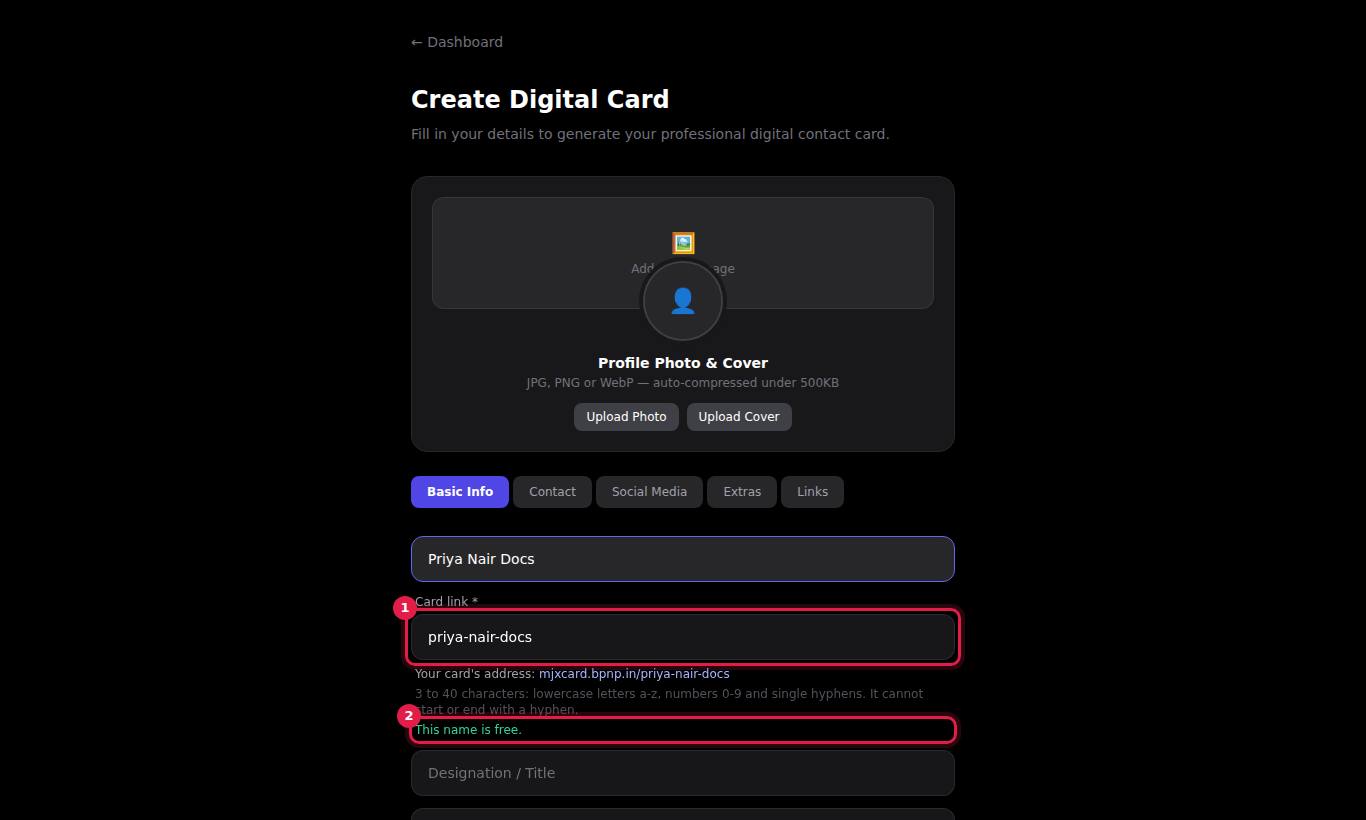
Every MJX Card has its own link made from your slug — the short name you type in Card link \* when you create the card. A slug of sunrise-coaching gives the link mjxcard.mjxtechnologies.com/sunrise-coaching.
#How your card link works
- Your card opens at
mjxcard.mjxtechnologies.com/<slug>. This is the link that Share Profile sends and that your QR code opens. - The same card also opens at
mjxcard.mjxtechnologies.com/profile/<slug>. The dashboard's View button uses this form. Both show the same card. - Your dashboard shows each card's slug as
/slugunder the card's name. - The link stays the same for the life of the card, whatever you edit.
#The rule for a card link name
A card link name must meet all of these:
| Rule | Allowed | Not allowed |
|---|---|---|
| Length | 3 to 40 characters | ab (too short), anything over 40 characters |
| Characters | lowercase letters a–z, numbers 0–9 and hyphens - | spaces, capital letters, dots, underscores, @, accents or any other symbol |
| Hyphens | single hyphens between words: priya-nair | -priya or priya- (hyphen at the start or end), priya--nair (two in a row) |
| Reserved words | any other word | a word the MJX Card site uses for its own pages — see the list below |
| Unique | a name no other card has | a name another card already uses |
While you type, the form helps you:
- Capital letters become lowercase and spaces become hyphens, so
Priya Nairturns intopriya-nair. - On a new card the link fills in from Full Name until you edit the link yourself.
- Under the field you see Your card's address: with the full link, the rule, and either This name is free. or what is wrong.
- If the name is taken or reserved, the form offers a free variant — press Use … to take it.
#Reserved words
These names are kept for the MJX Card site's own pages, files and future features. A card cannot use them:
| Reserved | Why |
|---|---|
login, dashboard, create-profile, edit-profile, profile, analytics, forgot-password, reset-password | Sign-in, dashboard and card pages |
terms, privacy, cookie-policy | Legal pages |
admin, superadmin, administrator | MJX's admin panel |
docs, api, upload, uploads, assets, static, index, landing, favicon, icons, robots, sitemap, llms, llms-full, mjx-logo | This help site, the home page, and the parts of the site that serve card data, images and files |
about, account, app, apps, auth, billing, blog, card, cards, contact, create, delete, download, edit, faq, help, home, logout, mjx, mjxcard, new, pricing, register, settings, signin, signup, sign-in, sign-up, support, user, users, www, root, null, undefined | Kept for future pages |
A reserved word is fine inside a longer name: priya-docs or login-solutions are allowed.
#How to choose a good slug
- Use your name or business name:
priya-nair,sunrise-coaching. - Keep it short enough to say out loud and type from a printed card.
- If your name is taken, add something that identifies you: city (
ravi-sharma-indore), profession (ravi-sharma-ca) or company (ravi-xyzsteel). - Read the full link under Your card's address: before you press Create Card.
#How to "change" a slug
Because the slug is locked, you have two choices:
- Make a new card. Press + New Card, fill it in with the new link name, then delete the old card from the Profiles tab with Delete. The old link, its QR code and its view history are gone for good.
- Ask MJX. Contact support with your old and new slug. The MJX team can move a card to a new slug, which keeps its history. The new slug must follow the same rule. Old links and printed QR codes stop working after the move.
#What can go wrong
| Message | What it means |
|---|---|
| Choose a name for your card's link. | The Card link field is empty. |
| Use at least 3 characters. | The name is shorter than 3 characters. |
| Use 40 characters or fewer. | The name is longer than 40 characters. |
| Use only lowercase letters a-z, numbers 0-9 and hyphens. No spaces, dots or other symbols. | The name has a character that is not allowed. |
| The name cannot start or end with a hyphen. | Remove the hyphen at the start or end. |
| Use single hyphens only, not two in a row. | Replace -- with -. |
| This name is reserved. Try another, such as docs-card. | The name is one of the reserved words above. Use the suggestion or add a word. |
| This name is already taken. Try another, such as ravi-sharma-card. | Another card already uses this name. Use the suggestion or pick a variation. |
| Enter the name to show on the card. | Full Name \* is empty. |
| Profile not found | Nobody has this slug, the card was deleted or it was hidden by MJX. Check the spelling of the link. |
#Questions people ask
What is a slug?
The slug is the name at the end of your card's link. If your slug is sunrise-coaching, your card lives at mjxcard.mjxtechnologies.com/sunrise-coaching.
What is allowed in a card link name?
3 to 40 characters, using only lowercase letters a-z, numbers 0-9 and single hyphens. It cannot start or end with a hyphen, cannot have two hyphens in a row, cannot be a reserved word such as login or docs, and cannot already be used by another card.
Can I change my slug later?
Not from your dashboard. The Card link field is locked on the Edit Card page. You can create a new card with a new link and delete the old one, or ask MJX support to change it.
Someone else has the slug I want. What can I do?
Each link name can be used by only one card. The form suggests a free name you can take with one tap, or add your city, company or profession, for example ravi-sharma-bhopal or ravi-sharma-ca.
Does my link change when I edit my card?
No. Editing details, photos or links never changes the link or the QR code.