
Get the verified badge on your card
Verify the email address on your MJX Card with a 6-digit code to show the verified tick. How it works, when it is removed and common errors.
In MJX Card, the verified badge is a small tick next to your name. You get it by confirming the email address on your card with a 6-digit code (OTP) sent to that inbox. Visitors who hover over or tap the tick see "Verified Profile".
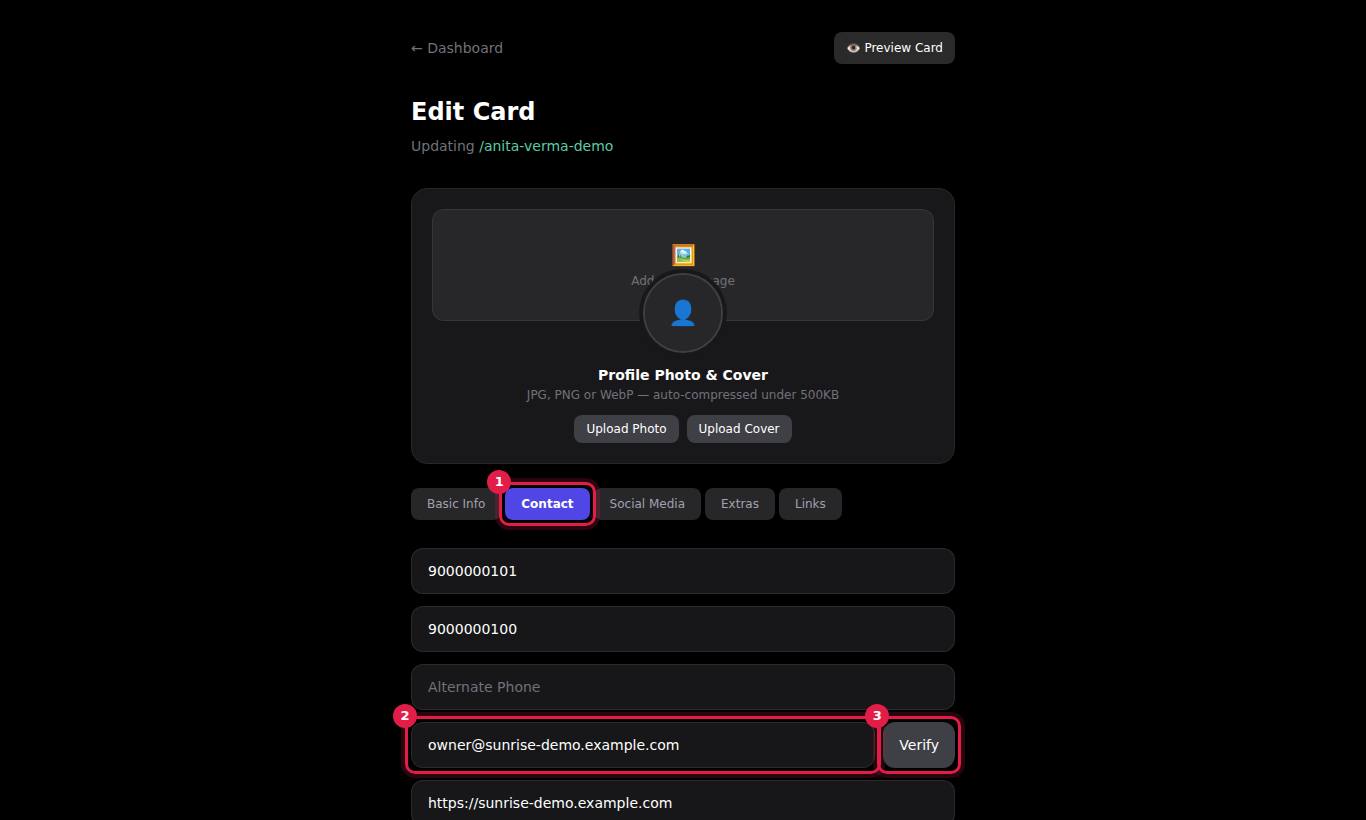
#Steps to verify your card's email
- Open the card form — + New Card or Edit on a card.
- Go to the Contact tab.
- Type the address in Email Address and press Verify next to it. The button shows "Sending...".
- The box changes to "OTP sent to" and your email address. Check that inbox for an email titled "Your email verification OTP".
- Type the 6-digit code into Enter OTP and press Confirm.
- When you see "Email verified successfully." and the button reads Verified, press Create Card or Save Changes to save the card.
#When the badge goes away
| You do this | Result |
|---|---|
| Change the Email Address to a new address | The badge is removed until the new address is verified |
| Clear the Email Address field | The badge is removed |
| Change the email back to the original verified address | The badge comes back |
| MJX turns the badge off | The badge is removed |
#Options
| Button | What it does |
|---|---|
| Verify | Sends a new 6-digit code to the address in the field |
| Confirm | Checks the code you typed |
| Change email | Goes back to the email field so you can fix a typo or use another address |
#Errors you may see
| Message | What to do |
|---|---|
| Please enter email first | Type an email address before pressing Verify. |
| Failed to send OTP | The code email could not be sent. Wait a minute and press Verify again. If it keeps failing, contact support. |
| No OTP found for this email | Press Verify to request a code for this exact address. |
| OTP expired | The code is older than 10 minutes. Press Change email, then Verify again. |
| Invalid OTP | The code does not match. Type it again carefully, or request a new one. Each new request replaces the old code. |
| This email is already verified. | Nothing to do — this card's email is already verified. |
#Who can verify
Any card owner, for their own cards. The MJX team can also set or remove the badge from the admin panel.
#Questions people ask
What does the verified badge mean?
It means the email address on the card was confirmed with a one-time code sent to that inbox, or that the MJX team marked the card as verified. It does not check the person's identity documents.
How long is the code valid?
10 minutes. After that you see "OTP expired" and need to press Verify again for a new code.
I changed my email and the badge disappeared. Why?
The badge belongs to a verified email. A new email address must be verified again before the badge comes back.
I did not get the code.
Check your spam or promotions folder and make sure the email address is typed correctly. Then press Change email and Verify again for a new code.
Do I need a verified email to publish a card?
No. Verification is optional. A card without it works the same, just without the tick.